
Information for exhibitors
On this page:
Click on the links below to take you to each section.- Documents you need to read (including Exhibitor Toolkit and the Health & Safety Induction)
- Exhibitor FAQs
- Event app - exhibitor profile and lead capture
Contact Nadja Hirzel for more info or if you have any questions about the exhibition, and Leeana Tamati if you have any questions about the event app.
Documents you need to read
Exhibitor Toolkit
The Exhibitor Toolkit provides you with everything you need to know about exhibiting at our expo, including key dates, timelines, contact details, what you can have at your site, a site plan, important health and safety information and checklists and forms.
Health & Safety induction
Please read the following Contractor Health and Safety Induction document.
Frequently Asked Questions
- Super Premium: 3.6m wide on the back wall, 3.6m deep on the side walls
- Premium: 3.6m wide on the back wall, 1.8m deep on the side walls
- Standard: 3m wide on the back wall, 1.8m deep on the side walls.
- desks;
- chairs;
- couches;
- cabinets or shelving;
- plants; and
- much more (see Exhibition Hire’s catalogue)
The deadline for getting your orders in is 4 May, however if you contact her now you may still be able to request some items.
The walls are Velcro receptive panelling, so it is best to use Velcro hook dots to put up posters. Velcro strips would be more suitable if the posters are heavy. You must not stick Blu-tack, pins or nails into the walls.
- Cabled internet: $115 + GST to install (includes Cat5 cable), then $52 + GST each subsequent day (includes de-install labour)
Tagging & testing
All electrical devices brought into the venues must be certified as being compliant with Electrical Standard NZS 3760-2010. The Venue Manager on site may undertake spot audits of this. All certifications must be dated within 12 months of the start of the conference and the in-date testing tag must be visible.
On site tagging and testing can be arranged prior. Please contact brendan@nwgroup.co.nz for further information and pricing by Monday 4 May. Exhibitors will be liable for any costs or damages to TSB Arena & Shed 6 due to the use of electrical devices that have not been tagged or tested.
Setting up
If you have equipment to unload, you can access the loading dock at the South end of the building on Jervois Quay when you arrive at the venue to set up on Monday 18 May. Exhibitors must first report to the Registration Desk in the Expo Hall before unloading or unpacking their equipment. Temporary parking for drop off/pick up is available in the loading dock (maximum of 10 minutes). Should you not require use of the loading dock, we kindly ask that you access the venue via the main entrance on 4 Queens Wharf during the scheduled pack in and pack out times.
The exhibition build is due to be completed by 13:00 on Monday, 18 May. Setup by the exhibitors can then commence, however, exhibitors must not enter the exhibition hall until the build has been completed. Setup must be completed by 6pm.
Attendees will start arriving for tea and coffee in the exhibition hall from 7.30am on Tuesday 19 May, so please ensure your site is fully set up before then. You must wear closed-in shoes and a Hi-Viz vest when setting up your site (you are required to supply your own Hi-Viz vest). If required, hard hats are available from the WasteMINZ + ALGA Registration Desk and must be worn when requested.
Yes, all deliveries to the venue must be communicated to nadja@wasteminz.org.nz no later than Monday 27 April. Deliveries of exhibition materials should not arrive at the loading dock any earlier than Thursday 14 May during the business hours Monday to Friday from 9am until 4pm. If this is not possible, exhibitors must contact Nadja and make special arrangements for deliveries arriving prior to this date.
Loading Dock hours are from 9am until 4pm Monday to Friday. Due to a busy event schedule and limited storage at the venue, we recommend you use a freight forwarding company to assist with arrangements for both delivery and off-site storage. Your freight will be delivered to your stand in the Exhibition area in the TSB Arena (as long as it has the correct delivery label attached and the stand number recorded). The delivery label can be found at the end of the Exhibitor Toolkit.
- Grey Street Carpark
2 Grey Street (Walking distance from TSB Arena: 200m (3 minutes)) - Victoria Street Carpark
21 Willeston Street (Walking distance from TSB Arena: 200m (3 minutes)) - Frank Kitts Car Park
68 Jervois Quay (Walking distance from TSB Arena: 200m (3 minutes))
Name badges can be collected from the registration desk in the Expo Hall on the Monday from 1pm onwards. Please collect your badge as soon as you have arrived at the venue.
Best Expo Site award
Yes, attendees will be voting for the Best Expo Site through the app during Tuesday and Wednesday. Criteria will include visual impact, clear purpose, presentation, staff and key sustainability elements. The winner will be announced at the gala dinner on the Wednesday evening.
Visitors
- Tuesday, 19 May: 11am – 12pm
- Wednesday, 20 May: 1.30pm – 2.30pm
Breaking down
The exhibition closes at 11am on Thursday, 21 May (as the morning tea is being held in the expo hall) and breakdown can then commence. Breakdown is not permitted before 11am and it must be completed by 12.30pm, as Exhibition Hire will start breaking down the sites at this time. You must wear closed-in shoes and Hi-Viz vests when breaking down your site. You are required to supply your own Hi-Viz vest. Hard hats are available from the WasteMINZ + ALGA Registration Desk if required and must be worn when requested.
Items need to be deposited at the Side Store by the Loading Dock and the Venue Manager advised that they are ready for pick up. It is the responsibility of the exhibitor to ensure the courier is scheduled to arrive after all items all are taken to the Loading Dock. Loading Dock hours are from 9am – 4pm Monday to Friday. All items left at the end of the conference for collection by couriers must be collected within 24 hours. The venue takes no responsibility for goods left on the premises past this time.
Event app - Eventify
This year's event app is run through Eventify. This is an all-in-one app, where you can update your own exhibitor profile, add discount codes, brochures and coupons, or easily capture leads. It also provides all the information about the conference, such as the schedule, speaker profiles, attendee profiles and more.
Learn how to access and use the app below.
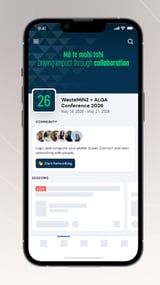
How to use the app
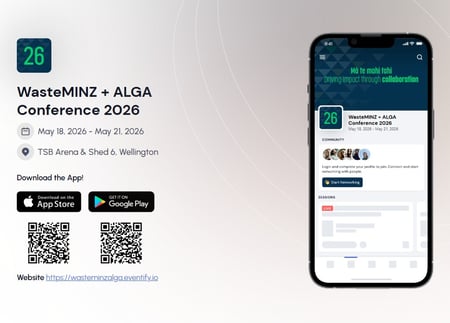
Download Eventify
Get it for iOS or Android at https://wasteminzalga.eventify.io/
Access the event
Search for WasteMINZ or ALGA
Login
If you have registered for the Conference, you will be sent an invitation by Eventify with your passcode. Use this passcode and the same email address you used for registration to sign in to the app.
Please note: This is an all-in-one app, so you can access all conference information as well as your exhibitor profile and QR scanning/lead capture.
Find and update your exhibitor profile
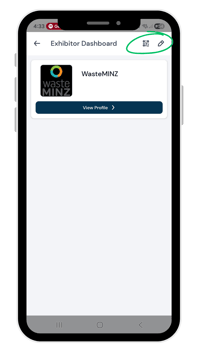
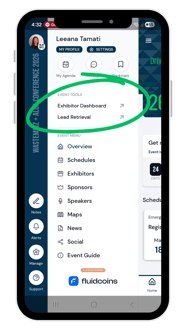
From the homepage, click on the side menu (the three lines at the top left). Under Event Tools, you will see Exhibitor Dashboard or Lead Retrieval.
Click on Exhibitor Dashboard. From this page, click on the pencil button at the top right to edit your profile.
Go through the steps to update your profile. This includes adding basic info such as a logo and bio (which will already populated, based on the information you've provided to us); contact details; social media and website details; images, videos and document; product details - where you can list specific products you want to highlight; and coupons and deals.
Capture leads
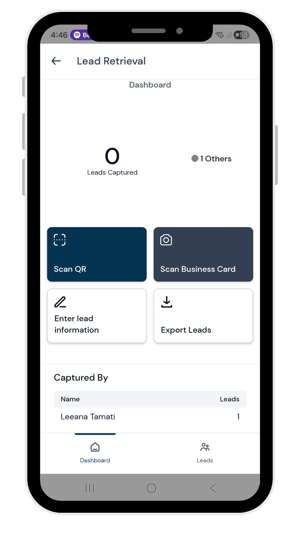
Back in the side menu, click on the Lead Retrieval option.
There are three options for you to capture leads:
- Scan attendee QR codes. This allows you to access attendee contact details via the QR code on attendee badges or through the app on their phone.
- Scan business card. This allows you to take a photo of a business card, and automatically enters the details in the lead capture form.
- Enter lead information. This allows you to manually enter contact details into a form.
Once you have captured the lead, you will be sent to a secondary page, which allows you to add further info - such as:
- Notes
- Special interests
- How soon the lead intends to engage
- Budget
- And more.
As an exhibitor, you can also scan attendee's QR codes using the main 'Scan' button on the bottom menu. This will also send you to the Lead Capture form.
Additional features
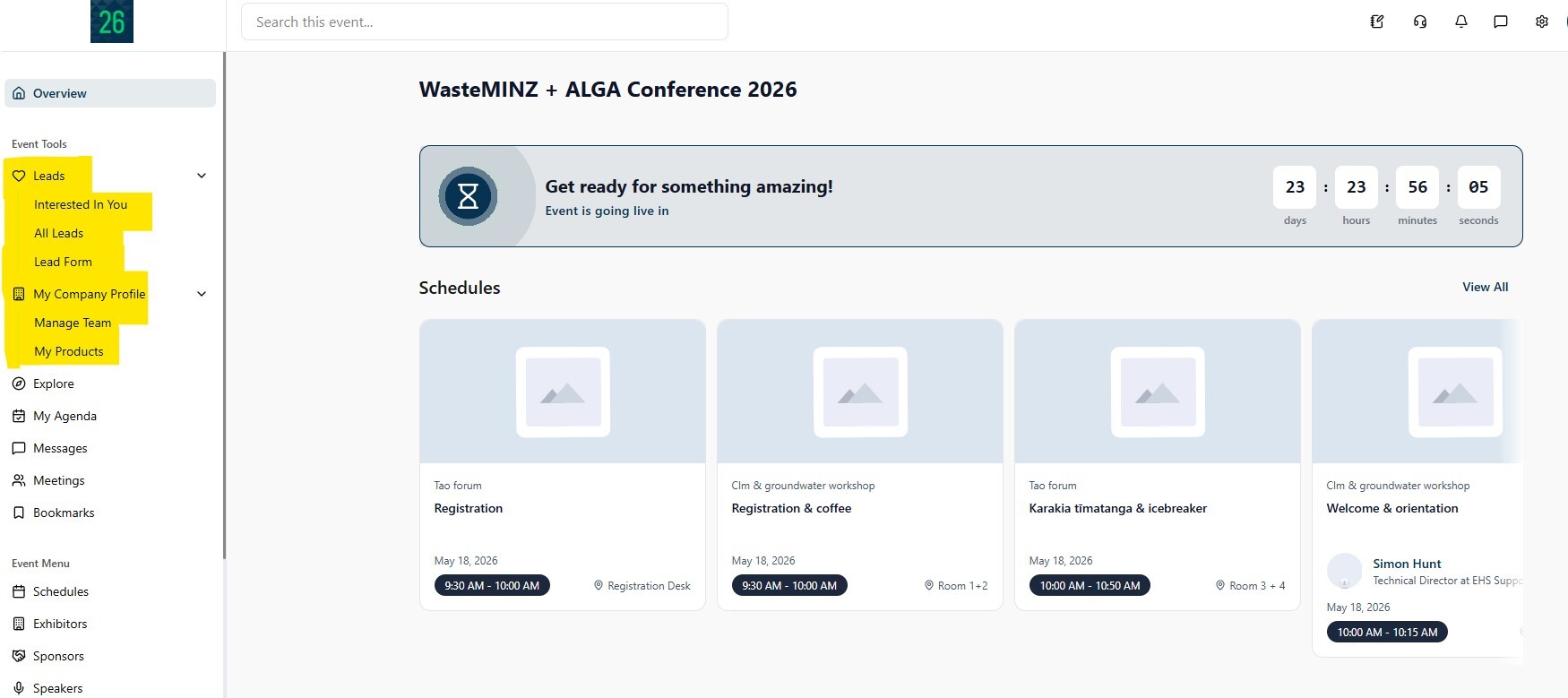
If you login to Eventify via a web browser (using this link: https://wasteminzalga.eventify.io/), you have access to additional features for exhibitors including:
- Seeing the attendees who scanned your QR Code
- Editing your lead retrieval form
- Seeing and adding additional team members.
See and export leads
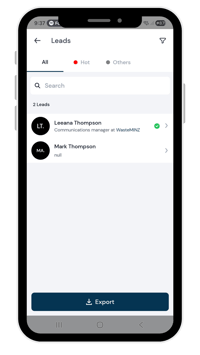
Select the Leads button at the bottom of the screen. This page shows you the leads that everyone in your team have captured.
Click the export button and you can choose whether to save it to your device or send it as an email.
Make sure you export your leads before Thursday, 28 May!
The app is live from 4 May to 28 May, so make sure to export them before 28 May so you don't lose them!
If you log out of the app, and can't remember your passcode - don't worry! When you enter your email address, a passcode will be sent to the same email address. You just need to ensure you are using the correct email - the same one you used to register.
If you have any issues, see the team at the registration desk or email Leeana on leeana@wasteminz.org.nz.
You'll be sent to a new page called Scan Result, which is where you can add more details about the lead.
A green banner will pop up at the top which says "Lead has been added to your collection".
When scanning a lead with the app, it will give you access to the following contact details, if they are updated on their profile:
- Phone
- Position
- Organisation
However, contact details for attendees such as Contact Number and Email may not display if the attendee has chosen not to share these personal details.
You cannot update the contact details of a lead that you have scanned via their QR code, so we recommend that you double check the lead's profile to ensure you have their details on file, and if not, you can add it to the notes section in their profile.
You can export your leads and your whole team's leads at any time during the event:
- From the Lead Retrieval page, click on Leads on the bottom menu. Then click Export.
- Select either:
-
- Save to device, or
- Send email.
Yes, you can access and download your QR code in the Scan QR section of Lead Retrieval.
Click on MY QR at the top left of the page, then scroll to see and download your QR code.
When attendees scan your QR Code, they are sent to your exhibitor profile and can send you a message or a meeting request, and see your profile information, discounts, products and exhibitor admin.
Attendees who scan your QR code will not immediately be captured as a lead, so you will not have to scroll through unqualified leads if you do display your exhibitor QR code. This is a great way to promote yourself and direct people to your profile.
Contact Leeana from WasteMINZ with the full name and email address of your team member, and she will add them to your team.
This year we are doing things differently by offering three spot prize vouchers for attendees who engage with the app.
While there will still be a leaderboard, which gives attendees points for engaging with their conference app - for example, messaging other attendees, checking out the programme, submitting a feedback form etc, we will be picking three attendees at random.
This way, we are encouraging attendees to engage with exhibitors in person and via the app, so exhibitors get genuine, qualified leads!
If you want to run a competition/giveaway via the app, there are two ways you can do this:
- Start a post in the Exhibitor Promos/Give-aways section in the app Community.
The Community is a place to follow topics and trends, discuss them with fellow attendees, and post your giveaways and promos!
You can post the details of your giveaway or promo, and encourage attendees to comment or post a picture in the same thread. You can then announce the winner on that same thread! - Start a post in the Social feed.
You can follow the same steps in the Social feed.
The Social feed allows you to add images, videos or polls, but as it is a feed, attendees will see all of the posts and yours may get lost.
It's up to you how you want to run your giveaway/promo! You can also message the winners through the app, provided they have their profile on public, or you have scanned their badge.
Contact leeana@wasteminz.org.nz for more support and information.