


Conference event app
WasteMINZ Conference Event App
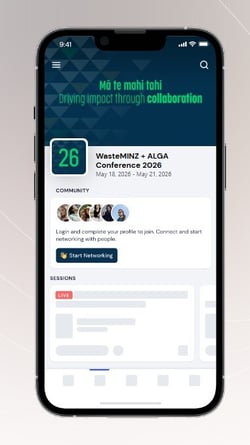
This year, all the information for the WasteMINZ + ALGA Conference 2026 will be hosted in the Eventify app. Just download the app on the App Store or the Google Play store and search “WasteMINZ” or “ALGA”
Two weeks prior to the conference, you’ll receive an email inviting you to the app with your passcode and providing further information about how to use it. You must use the same email address that you used to register to login to the app, as this will give you access to all the best features of the app!
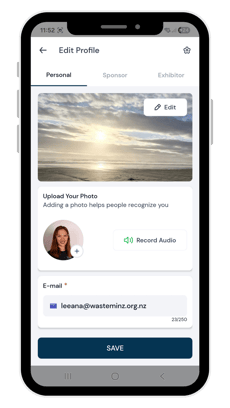
We’d encourage you to upload a profile pic, and ensure your profile is public so you can share your contact details with other conference delegates and message each other easily.
Here are some highlights of what you can do with this app:
- Learn about our speakers, sponsors and exhibitors.
- See who else is attending, and message, book meetings and share your contact details with them.
- Easily find the rooms your preferred sessions are located in.
- Access our full programme, including information about each presentation in the sessions.
- Ask questions of our keynote speakers.
- Give feedback on keynotes, speakers, panels and workshop sessions.
- Bookmark your favourite sessions, write notes and export them easily.
- Vote for the Best Expo Site.
- Read how-to info for using the app.
- Engage with the app and be in to win one of three spot prize vouchers!
How to log in
1. Download Eventify Event App
Search for Eventify in your app store, or download it here:
(Please note, this is a different app to last year).
2. Access your event
Search for WasteMINZ or ALGA
3. Login
You will have been sent an invitation to login to the app, to the email address that you provided in your registration form.
This will give you your passcode. Use the same email address and this passcode to log in.
If you get logged out and forget your passcode – never fear! When you enter your email address to log in, you will be sent an email with your passcode in it. Alternatively, contact the WasteMINZ team to ask for help.
4. Set up the app
When you login, you’ll be sent to your profile, which you can update, including uploading a profile picture, adding a bio, LinkedIn profile and more.
At the bottom of the page, please make sure you tick “Networking/GDPR consent” - this is the privacy policy. GDPR means General Data Protection Regulation and is used as this is an international app. Ticking this allows you to share your profile and connect with others.
.png?width=230&height=409&name=Edit%20profile%20(2).png)
Navigating the app
Schedules
Find your preferred streams:
The schedule is grouped based on which room each session is in. To find the sessions you are interested in, such as CLM & Groundwater or Waste & Resource Recovery:
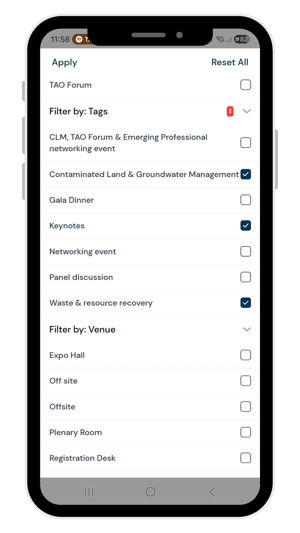
- Select the Filter button
- Scroll down to the section that says Filter By Tags
- Select which option you would like – such as Contaminated Land and Groundwater Management
- Select apply. The app will now show you all the sessions tagged with Contaminated Land & Groundwater Management.
- Bookmark the sessions you would like to attend.
Find your customised agenda:
Once you have bookmarked your preferred sessions, you can switch to your own agenda at the top of the schedules page.
Alternatively, you can find it from the Homepage by selecting the side menu and clicking the My Agenda section at the top of the menu.
Connecting with others
From the side menu, you can see the Attendee List. This allows to either search for or scroll through attendee profiles. When you click on the profile, you can see their information, message them or request to meet with them.
The homepage will also give you suggested contacts, based on your interests.
Community, gallery & social feeds
As you explore the app, you’ll see three different ways to engage with others:
- Gallery – Upload your photos to show us how much fun you’re having, who you’ve connected with, and what sessions you have loved! There will be a spot prize for one person who uploads a photo to the Gallery.
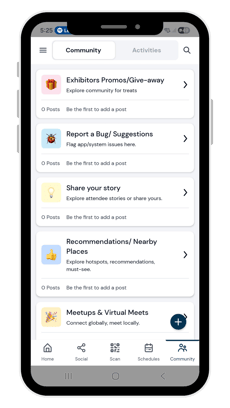
- Community – This is a discussion forum, where you can post about different topics – including exhibitor giveaways, recommendations for things to do in Wellington, and event updates
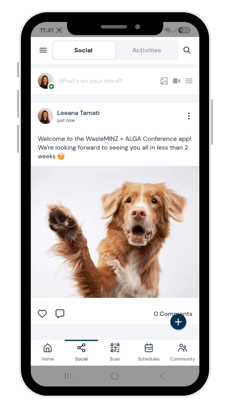
- Social feed – Share your thoughts, fun tips and tricks, and comment on each other’s posts. Think of it as an in-app Facebook
Customising your sponsor or speaker profile
For speakers:
Speakers can access their own profile, to update their contact information, social media profiles, bio and profile photo.
There are two ways to access your speaker profile:
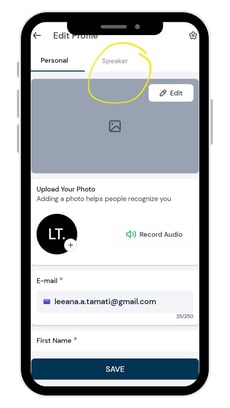
- Select My Profile at the top of the side menu, then select the pencil at the top right of the menu to edit your profile. On the next page, you'll be able to switch between your attendee profile and your speaker profile.
For sponsors:
Sponsors can access their own profile, to update their contact information, social media profiles, documents, images and videos.
You can also see the stats about your sponsor profile, such as engagement metrics and attendee traffic.
In the side menu, under Event Tools, select Sponsor Profile, then tap the pencil button on the top right to edit your profile.
For exhibitors:
Find out more on this page.
Asking questions of our keynotes
We’ll use the app to ask questions to our keynotes. Simply:
- Go to the keynote session that you are in
- Click on the button at the bottom saying "Live Q & A"
- Type in your question! If there are two keynotes, please try and add the name of the keynote for before your question.
Engage with the app and you could be in to win!
We’ll be giving away three $50 vouchers as spot prizes during the conference. Each day, one winner will be randomly selected based on a chosen type of app engagement - for example, uploading a photo to the gallery one day or sending a message the next. The more you engage with the app, the higher your chances are to win a prize!
If you are competitive - you can still compete for the top spot on the leaderboard! Your prize will be the pride of the win, kudos from your peers and the opportunity to win the spot prize.
Take on as many challenges and activities as you can. Points await you for activities such as commenting, liking, and completing your profile. Uncover hidden bonus points in various tasks, and some challenges offer extra rewards like certificates, coupons, and exclusive offers.
Stay tuned to the leaderboard to track your ranking and see how you measure up against others and compete for the top spot.
.png?width=230&height=409&name=Social%20(2).png)

Creating a future where people, communities and nature in Aotearoa New Zealand thrive together